Top Guests
Report Parameters
|
Field |
Description |
|---|---|
|
Report Name |
Select the Top Guest option from this drop-down list. |
|
Start Date |
The start date from when the report must be generated. |
|
End Date |
The end date until when the report must be generated |
|
Sort Options |
Available options include the following:
|
|
Top Cities |
Select the preferred options to filter report data based on the top cities used in reservations or guest profiles. |
|
Area Codes |
Select the preferred options to filter report data based on the top zip codes used in reservations or guest profiles. |
|
Days of Week |
Select the preferred days from the drop-down based on which room revenue or number of days of stay must be calculated. |
|
Guest Type |
Select the preferred options to filter report data based on the top guest types used in reservations or guest profiles. |
|
Top Guests |
Enter the number of guests details to be printed in the report. Users can enter values between 10 to 100. |
|
Include Group Master |
When enabled, the revenue details of the group master will be included in the report. By default, the flag will be disabled. |
Sample Report
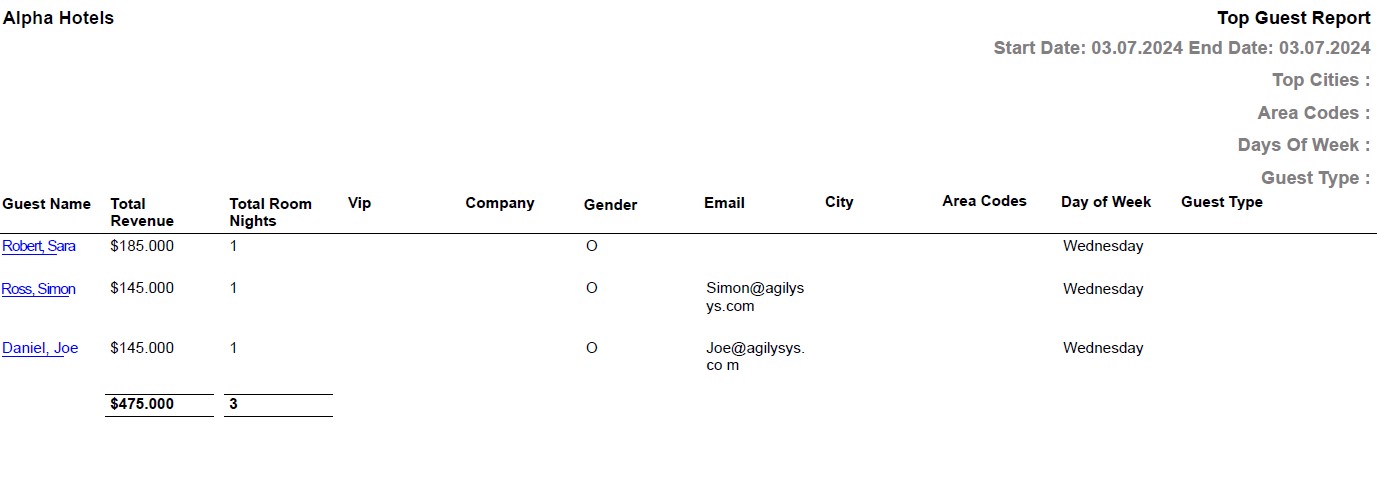
Report Fields
|
Field |
Description |
|---|---|
|
Guest Name |
The name of the guest will appear as a hyperlink and clicking it will navigate the user to the guest record. |
|
Total Revenue |
The total revenue generated from the guest stays. |
|
Total Room Nights |
The total number of reservation nights by the guest at the property. |
|
Vip |
VIP status of the guest. |
|
Company |
The company name from the guest record. |
|
Gender |
The gender of the guest. |
|
|
The email address of the guest. |